
Inland Marine Policy Change Transformation
Streamlining complex policy changes for faster agent and underwriter workflows at West Bend Insurance Company.
Timeline
July – October 2025
Role
UX Researcher & Designer
Context & Challenge
Policy Change Transformation (PCT) is West Bend's initiative to make policy updates faster and easier. Before this project, even simple changes, like updating a vehicle or address, took an average of eight days to process. As part of the UX team, I worked on redesigning one of the most complex workflows, Inland Marine policies. The goal was to simplify the experience, reduce manual work, and help agents and underwriters process policy changes more efficiently.
Each policy change could require navigating through 5+ screens and multiple note entries.
-
Each policy change could require navigating through 5+ screens and multiple note entries. -
Research Goals & Methods
The discovery phase centered on identifying:
What slows down Underwriter Techs when processing Inland Marine changes.
How system limitations force extra manual work.
Which specific Inland Marine scenarios or change types introduce the most complexity.
User Interview Highlights
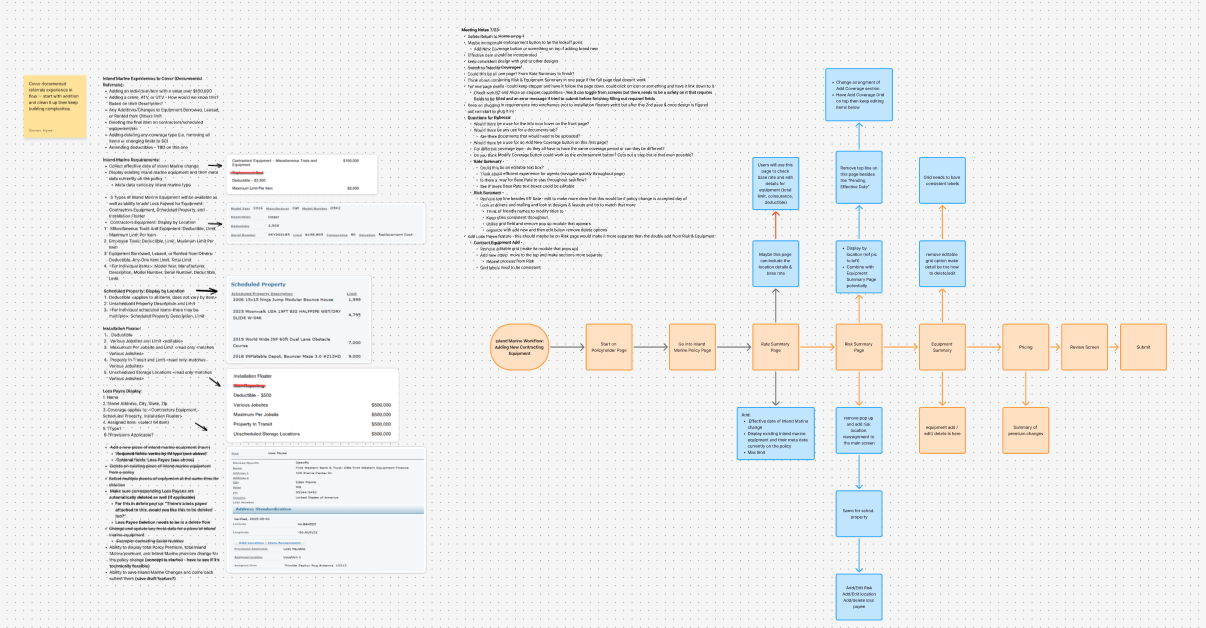
Interviews revealed that most underwriters work within a single product type and feel uncertain during deletions or endorsements because linked loss payees and items aren’t clearly shown. Frequent navigation between screens and manual note-taking outside the system slowed them down, and some required fields added no real value.
Key Insights
Focus on single-type workflows over multi-type switching
Auto-fill notes to replace manual documentation
Clarify loss payee links during deletions
Reduce navigation between queue, notes, and pricing screens
Simplify or automate low-value required fields
“If I remove an item, I can’t tell which Bank of America loss payee it belongs to — I have to click through every record.”

Design Process
Design Approach
The design phase focused on streamlining Inland Marine policy changes to improve speed and accuracy for agents and underwriters. The workflow for adding an ATV to Contractor’s Equipment illustrates how research insights shaped a simpler, more transparent experience across the platform.
Adding an ATV to a Contractor’s Equipment policy highlights complex rules, including high-value thresholds, referral triggers, and linked loss payees. Collaboration with the Senior UX Designer ensured consistent workflows across Inland Marine and vehicle entries, so users wouldn’t have to learn two systems.
Key Challenges
Multi-tab workflow required extra clicks.
Manual note-taking for referral and loss payee tracking
Limited visibility of key data in one screen.
Legacy interface lacked inline validation and adaptive fields.
Design Goals & Constraints
The research phase revealed that underwriter techs were frequently switching between multiple tabs, taking extensive handwritten notes, and relying on memory to track referral rules and linked loss payees. The goal for the redesign was to create a more predictable, guided workflow that reduced the cognitive load and manual steps required in the legacy system.
A first-pass release was required by end of 2025. Loss Payee and Location fields were temporarily replaced with a Notes section to capture underwriter intent, with full integration planned for 2026. The “Other” equipment flow also used a Notes section to handle unique edge-case details.
See below for current Duck Creek Interface!
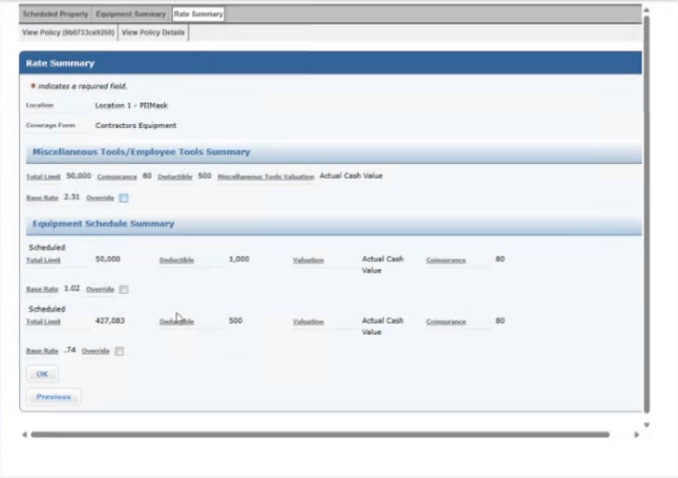
Here you can see the current tabbing section users have to go through to enter new equipment.
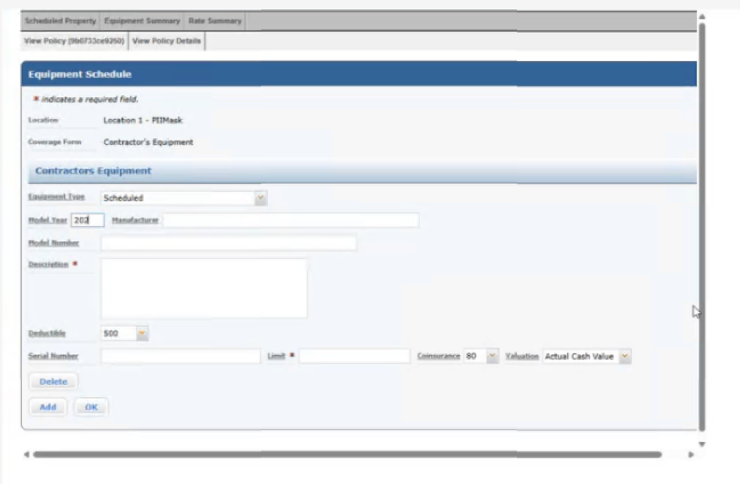
This is the current add equipment page, there's an additional Add Risk Summary page as well that adds more data for the user to enter.
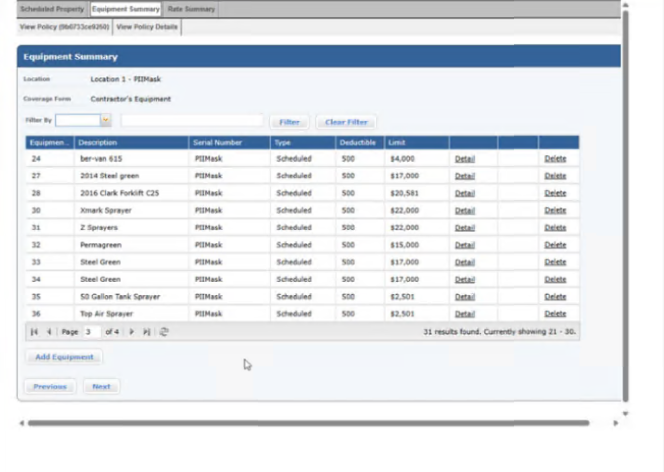
The current system grid, the search features aren't as functional or selective as they could be.
Design Iterations & Process
The design process moved through three structured iterations, each building on research insights and collaboration with the UX team and underwriter tech. Early passes focused on translating the existing Duck Creek workflow into a more guided, modal-based experience without disrupting familiar patterns. Later iterations shifted toward reducing cognitive load, simplifying steps, and preparing the system for phased technical rollout.
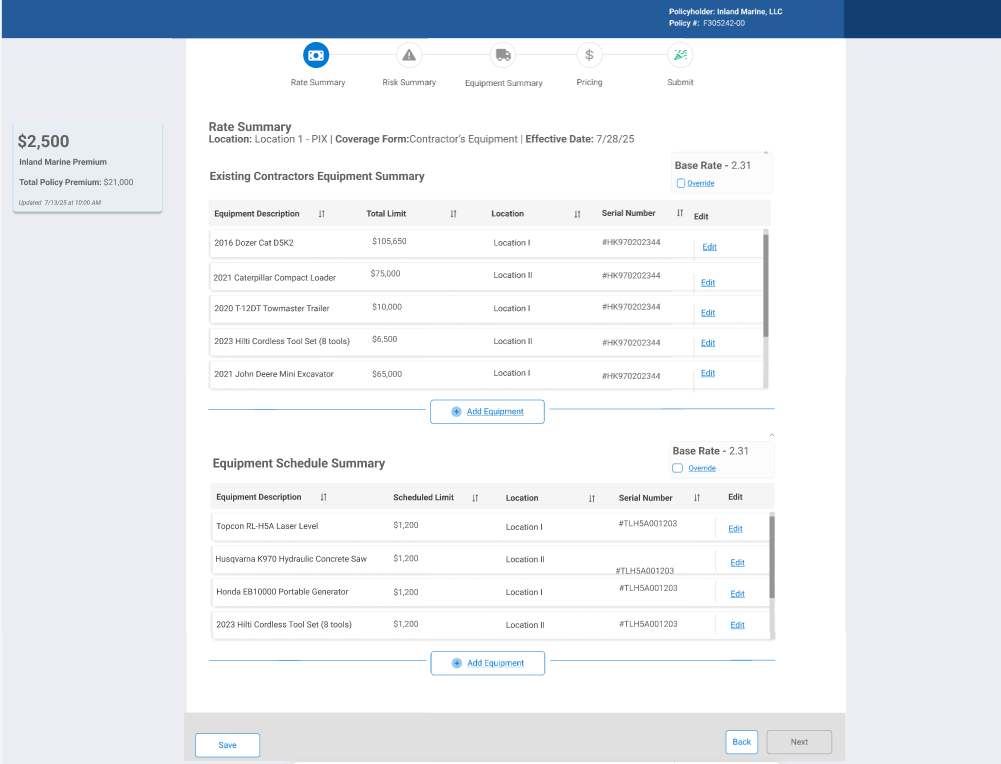
Iteration 1 — Legacy-Aligned Structure
The first iteration mirrored the existing Duck Creek experience to validate business rules, required fields, and terminology before redesigning the workflow. It still relied on multiple tabs, separate equipment lists, and in-page forms, requiring users to navigate between screens and keep track of information manually.
Why it mattered: It established a baseline that made it easier to identify where navigation, complexity, and manual work could be reduced.
Iteration 2— Streamlined Equipment Workflow
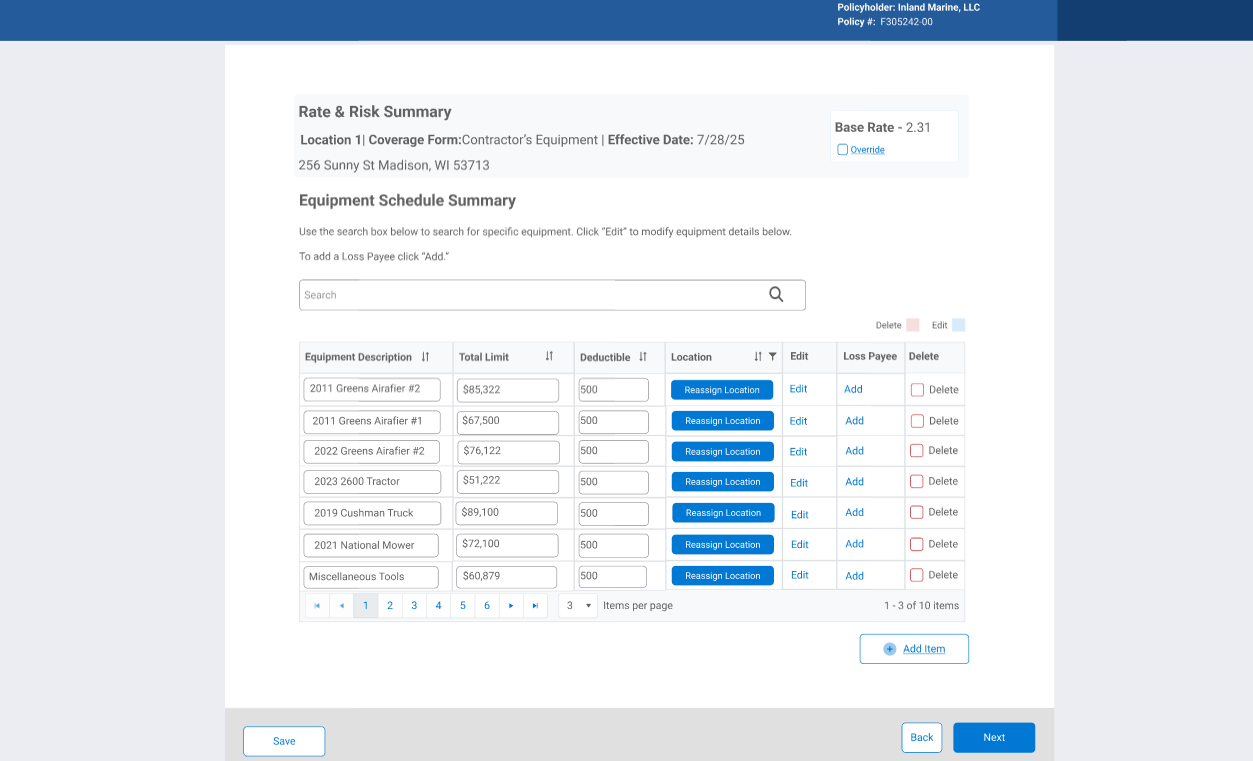
Based on feedback from Iteration 1, the second version combined separate equipment lists into a single summary, surfaced key actions like Reassign Location, Loss Payee, and Delete, and removed features that weren't consistent across PCT workflows. The layout was also cleaned up to reduce scrolling and navigation.
What changed
Combined existing and scheduled equipment into one list
Added quick actions for locations, loss payees, and deletions
Removed the tracker and moved premium details to the end of the flow
Reduced scrolling with a cleaner layout
Why it mattered: Equipment management became faster, more intuitive, and required fewer clicks.
Iteration 3— Optimized Equipment Management
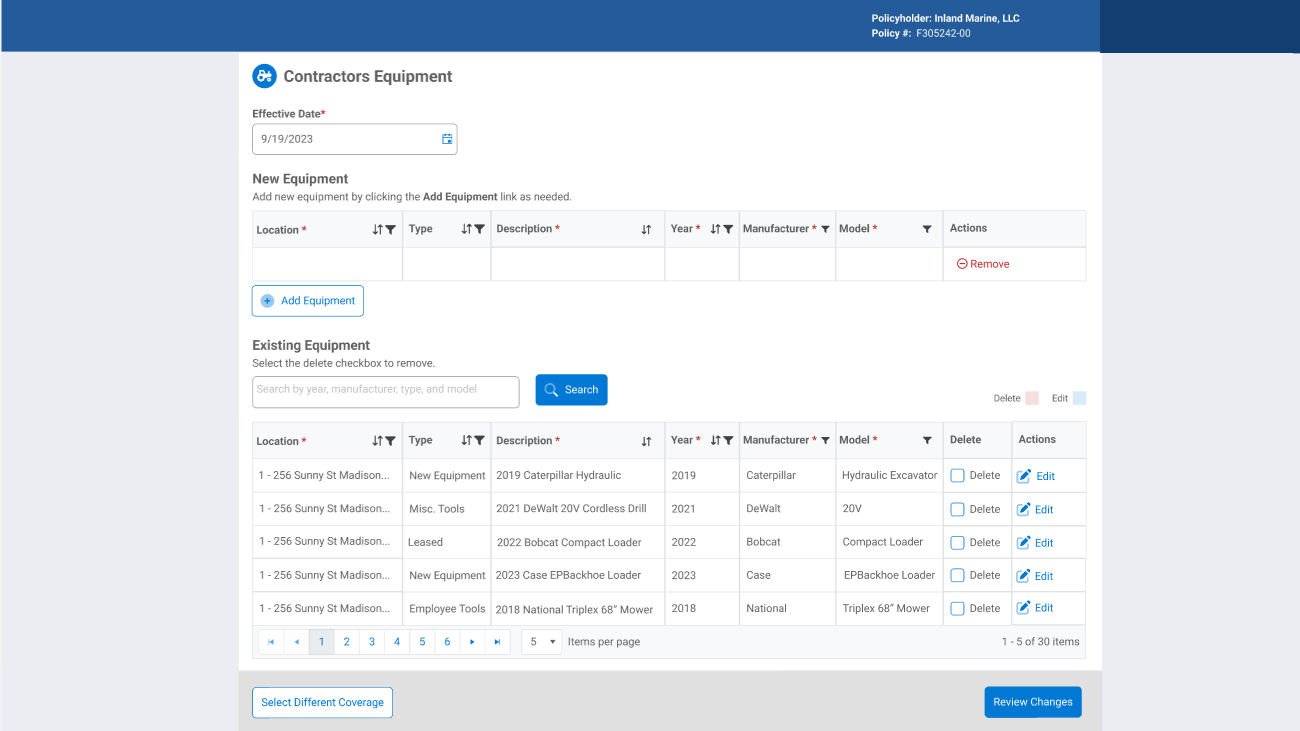
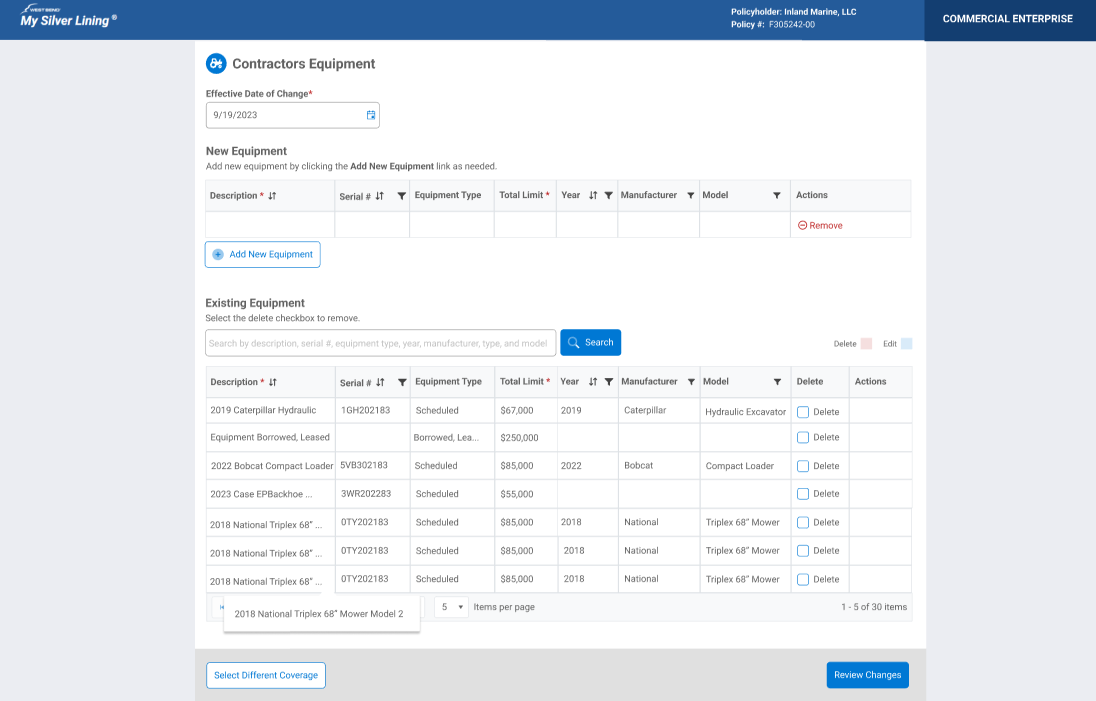
The third iteration focused on improving structure, searchability, and flexibility based on feedback from earlier versions. It separated adding new equipment from editing existing items and introduced a more organized grid to support faster updates and reduce data entry issues.
What changed
Separated new equipment entry from existing equipment management
Added searchable fields like serial number, year, manufacturer, and model
Moved edits into a modal to improve consistency and validation
Standardized equipment details while allowing flexibility during entry
Why it mattered: This iteration improved clarity and organization while addressing common errors and supporting different ways agents manage equipment. It created a stronger foundation for continued refinement.
Final Version — Production-Ready Workflow
The final version refined the previous iteration with small adjustments to improve clarity, space, and usability. The workflow stayed structured while making key information easier to view and manage.
What changed
Kept separate sections for adding new and editing existing equipment
Removed the location column from the grid and managed it within the edit modal
Added hover details for full equipment descriptions
Retained the Effective Date section for future-dated policy changes
Why it mattered: The final design created a cleaner, more efficient workflow that reduced errors and helped agents manage equipment changes with confidence.
Final Inland Marine Workflow
Final Design Decisions:
For the final version of the Inland Marine equipment workflow, this walkthrough demonstrates the fully refined end-to-end experience. The video shows the completed interaction model in motion, while the steps below highlight key design decisions and why they matter.
Workflow Highlights (Paired with Video)
1. Agent Dashboard → Policy Entry
Entry point shows all policy change options in one place. Selecting Inland Marine Equipment reinforces consistency with other change types like drivers and vehicles.
2. Coverage Categories & Actions
Coverage categories (Contractors Equipment, Installation Floater, Scheduled Property Floater) are separated from actions. This supports faster scanning and reduces selection errors.
3. Contractors Equipment Main Screen
The Effective Date of Change leads the page to reinforce real-world policy timing. New vs. Existing Equipment sections are clearly separated to reduce cognitive load.
4. Add New Equipment Modal
Structured fields (Type, Serial, Limits, Year, Manufacturer, Model) support clean data, while the optional Description field preserves agent flexibility.
5. Notes as a Flexible Placeholder
Notes temporarily capture location, loss payee, and additional interest to allow early rollout without blocking core functionality.
6. Explicit Delete with Undo & Review
Delete requires confirmation through Review Changes to prevent accidental loss. This directly resolved a high-risk pain point from Iteration 2.
7. Review Changes as a Safety Net
All adds, edits, and deletions are confirmed in one place before submission.
8. Platform Processing & Expectations
Duck Creek processing feedback is shown to set expectations and reduce uncertainty.
9. Submission Confirmation
Final confirmation reinforces completion and underwriter handoff.
Learnings & Takeaways
This project taught me that the best solutions come from continuously listening, testing, and refining. Early conversations with underwriter techs showed that they were spending a lot of time jumping between tabs, keeping track of information outside the system, and relying on memory to manage complex policy rules. With each iteration, we looked for ways to take that burden off the user by making information easier to find, reducing unnecessary steps, and creating a workflow that felt more natural.
One of the biggest shifts came from rethinking the page structure. Instead of creating another long scrolling screen, we explored a modal-based approach that allowed users to focus on one task at a time. This helped reduce clutter, made important actions easier to understand, and gave users more confidence when making policy changes.
The work also helped establish a foundation for the larger Policy Change Transformation initiative by creating reusable patterns and a more consistent experience across workflows. Seeing agents test the updated experience and achieve an 8% improvement in quoting speed reinforced how small, thoughtful design decisions can make a meaningful impact on complex enterprise systems.